720º

20K plays 1986 #Sport
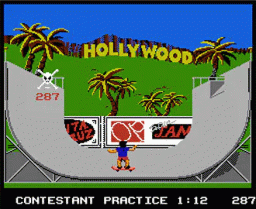
720° is a skateboarding video game released in arcades by Atari Games in 1986, in which the player controls a skateboarder skating around a middle-class neighborhood. By doing jumps and tricks, the player can eventually acquire enough points to compete at a skate park. The game's name comes from the 'ultimate' trick, turning a full 720° (two complete circles) in the air after jumping off a ramp.
The game begins with the player controlling a skateboarder skating around a middle-class neighborhood using common objects as ramps for jumps. The player begins with a number of 'tickets,' each of which grants admission to one of four skate parks, or 'events,' in Skate City, the 'hub' between the parks. When a park is entered, one ticket is expended. The player gains additional tickets from earning points. Whenever the player isn't in an event, a bar counts down the time remaining until the arrival of a swarm of killer bees accompanied by the caption of 'SKATE OR DIE!'. Once the bees arrive, the player still has a small amount of time in which to get to a park, but the longer the player delays, this the faster the bees become, until they are unavoidable. Getting caught by the bees ends the game, though on default settings the player may elect to continue by inserting more money. Reaching a park with a ticket gives the player the chance to earn points, medals and money with which to upgrade equipment, and resets the timer.
The player constantly races to perform stunts, both in the events and in the park itself, in order to earn the points needed to acquire tickets. Thus, the player's score is directly tied to the amount of time available to play the game. In order to win, the player must complete a total of sixteen events through four hubs, a difficult task.
Text: Wikipedia via RetroGames.cz, licensed under CC BY-SA 3.0
Keyboard controls
| NES | Player 1 | Player 2 |
|---|---|---|
| D-pad | ↑↓←→ | IKJL |
| B | Z | N |
| A | X | M |
| Select | Shift | B |
| Start | Enter | Space |
Hotkeys
- 1 Quick save state
- 2 Quick load state
- 3 Change save slot
Gamepads are detected when you press a button. Remap any key from the emulator’s Controls menu (gear icon).
Live chat
Connecting…
Keyboard controls
| NES | Player 1 | Player 2 |
|---|---|---|
| D-pad | ↑↓←→ | IKJL |
| B | Z | N |
| A | X | M |
| Select | Shift | B |
| Start | Enter | Space |
Hotkeys
- 1 Quick save state
- 2 Quick load state
- 3 Change save slot
Gamepads are detected when you press a button. Remap any key from the emulator’s Controls menu (gear icon).
Comments