Baseball

392K plays 1983 #Sport
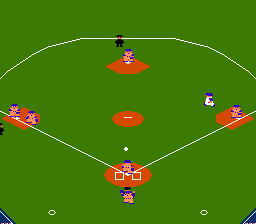
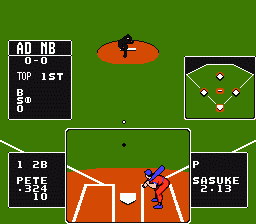
Baseball is a video game made by Nintendo in 1983 for the Nintendo Family Computer, making it one of the first games released for the Famicom. It was later one of the NES's 18 launch titles when it was released in 1985 in the United States. As in real baseball, the object of the game is to score the most runs. Up to two players are supported. Each player can select from one of six teams. The game's team names are intended to represent members of the Japanese Central League in the Famicom version and members of Major League Baseball (MLB) for the American version.
As in real baseball, the object of the game is to score the most runs. The game supports one player versus a computer opponent, or two players. Each player can select from one of six teams. Although there is no difference between them other than uniform color, the teams are meant to represent the six members of the Japanese Central League. For the American version, the letters of the teams were renamed to more closely resemble several of the Major League Baseball teams:
Text: Wikipedia via RetroGames.cz, licensed under CC BY-SA 3.0
Keyboard controls
| NES | Player 1 | Player 2 |
|---|---|---|
| D-pad | ↑↓←→ | IKJL |
| B | Z | N |
| A | X | M |
| Select | Shift | B |
| Start | Enter | Space |
Hotkeys
- 1 Quick save state
- 2 Quick load state
- 3 Change save slot
Gamepads are detected when you press a button. Remap any key from the emulator’s Controls menu (gear icon).
Comments