World Grand Prix
49K plays 1986 #Racing
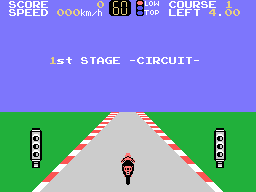
World Grand Prix is a 1986 Sega Master System video game. During the course of the game, the player uses a Formula One style car. He or she has to drive the car as quickly as possible while navigating through turns and other vehicles on the road. A formal scoring system is not used; players are not ranked by position unlike most racing games. This kind of timekeeping would not be used in a subsequent video game until the Nintendo Family Computer release of Taito Grand Prix: Eikou heno License the following year. From the 1970s Ferrari pictured in the main menu and the circuits used in the game, the game appears to be loosely based on 1970s Formula One. The game uses a third-person perspective.
The absence of an authentic Formula One license made it difficult to research the actual Formula One machines of that time; players had to use generic two speed manual transmission machines. While using the regular tracks, the player must either match or beat the target time in order to move to the next level. Otherwise, a game over message will appear without revealing the final score of the game. Getting lower than the target time will score points that will lead to upgrades for his or her vehicle. All races are one lap only regardless if the track was custom built or previously designed.
World Grand Prix would be ahead of its time for working around the 8-bit math processor to allow the car to travel in excess of 255 kilometres per hour. This was considered to be a limitation found in the Nintendo Entertainment System video game Formula One: Built to Win that still had to deal with having 255 as the highest possible number (this problem was endemic to Nintendo games but nearly absent in Sega 8-bit games).
Text: Wikipedia via RetroGames.cz, licensed under CC BY-SA 3.0
Keyboard controls
| SG-1000 | Player 1 | Player 2 |
|---|---|---|
| D-pad | ↑↓←→ | IKJL |
| Button 1 | Z | N |
| Button 2 | X | M |
| Pause | Enter |
Hotkeys
- 1 Quick save state
- 2 Quick load state
- 3 Change save slot
Gamepads are detected when you press a button. Remap any key from the emulator’s Controls menu (gear icon).
Live chat
Connecting…
Keyboard controls
| SG-1000 | Player 1 | Player 2 |
|---|---|---|
| D-pad | ↑↓←→ | IKJL |
| Button 1 | Z | N |
| Button 2 | X | M |
| Pause | Enter |
Hotkeys
- 1 Quick save state
- 2 Quick load state
- 3 Change save slot
Gamepads are detected when you press a button. Remap any key from the emulator’s Controls menu (gear icon).
Comments