Maui Mallard in Cold Shadow

0 plays 1996 #Action
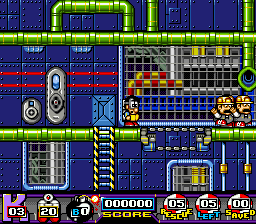
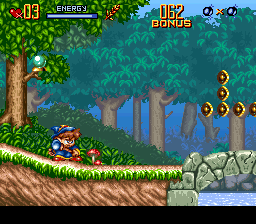
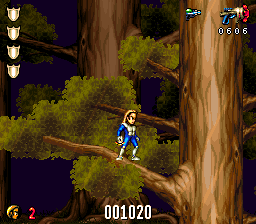
Maui Mallard in Cold Shadow – originally released as Donald in Maui Mallard (Japanese: Donald Duck no Maui Mallard (ドナルドダックのマウイマラード)) – is a platforming video game developed and published by Disney Interactive. The game was released in Europe in November 1995, and in Brazil in spring 1997 for the Sega Mega Drive. It was also ported by Eurocom Entertainment Software to the Super NES and released in North America in January 1997, in Europe mostly in autumn 1996 (although the SNES version was released in Germany at the end of 1995), and in Japan on December 20, 1996. A Microsoft Windows port was released in North America in November 1996. It was ported one last time to the Game Boy by Bonsai Entertainment Corp., released in North America in August 1998.
The game stars Donald Duck in a metafictional role as duck detective Maui Mallard (a spoof of 1980s Hawaii-based TV detective, Magnum P.I. in name and appearance), who adopts the name "Cold Shadow" when he dresses up in ninja garb. In the North American versions of the game, all Donald Duck references are absent, and the protagonist is instead referred to as "Maui Mallard," as, according to composer Patrick Collins, the marketing team felt Donald Duck wasn't cool in the United States. Although the end of the game informed the player to look forward to Maui's next adventure, the planned sequel was cancelled.
The game was rereleased on the Steam and GOG digital storefronts on May 17, 2019.
From Wikipedia's article Maui Mallard in Cold Shadow
Keyboard controls
| SNES | Player 1 | Player 2 |
|---|---|---|
| D-pad | ↑↓←→ | IKJL |
| A | Z | M |
| B | X | N |
| X | A | U |
| Y | S | H |
| L | Q | Y |
| R | E | O |
| Select | Shift | B |
| Start | Enter | Space |
Hotkeys
- 1 Quick save state
- 2 Quick load state
- 3 Change save slot
Gamepads are detected when you press a button. Remap any key from the emulator’s Controls menu (gear icon).
Online, both players use the Player 1 keys (or a gamepad) on their own computer. Saving, loading and pausing are off while you play online.
Live chat
Connecting…
Keyboard controls
| SNES | Player 1 | Player 2 |
|---|---|---|
| D-pad | ↑↓←→ | IKJL |
| A | Z | M |
| B | X | N |
| X | A | U |
| Y | S | H |
| L | Q | Y |
| R | E | O |
| Select | Shift | B |
| Start | Enter | Space |
Hotkeys
- 1 Quick save state
- 2 Quick load state
- 3 Change save slot
Gamepads are detected when you press a button. Remap any key from the emulator’s Controls menu (gear icon).
Online, both players use the Player 1 keys (or a gamepad) on their own computer. Saving, loading and pausing are off while you play online.
3.5 Good job
Critics 76 · 3 reviews
Review scorecard
- Graphics 3.5 out of 5 Overall fallback
- Sound 3.5 out of 5 Overall fallback
- Control 3.5 out of 5 Overall fallback
- Fun Factor 3.5 out of 5 Overall fallback
Overall fallback: Critics 76 · 3 reviews. Overall source The same 76/100 overall rating fills missing categories using the face scale; these are not separate category scores.
What the reviews talk about
Key wordschoppydetailedfun
Scores
- 90 AllGame 4.5/5
- 81 Electronic Gaming Monthly 8/10, 8/10, 8.5/10, 8/10 (SNES)
- 58 Famitsu1996 5/10, 6/10, 6/10, 6/10
- 70 GameSpot1996 7/10 (WIN) · other versions
From the review table in Wikipedia's Maui Mallard in Cold Shadow article.
Full reviews
Play online
Play with a friend on another computer. Host a room and send them the link, or list it in Open rooms for anyone to join; they play as Player 2 and you both see the same game.
Press Start Game first.
Go live
Let anyone watch you play, live in their browser. They see your game as you play it, and your online game when you host a room.
Press Start Game first.
Comments